

Take and manage bookings
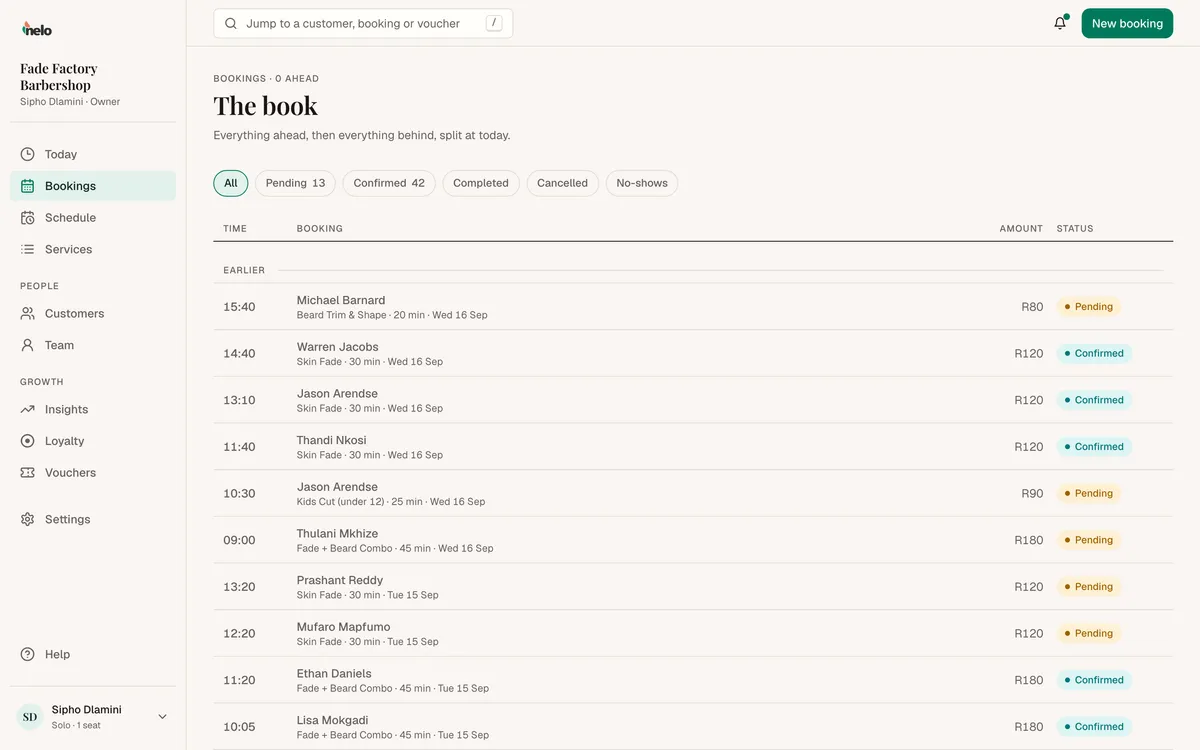
Every booking lands on the book. Confirm it, close it out, or cancel it.
Add a booking yourself
For a walk-in or a phone call, tap New booking at the top of any page. On a keyboard, press N.
- Who: search your customers by name or number, or tap Add a new customer.
- What: the service.
- With: a person, or Anyone.
- When: a day, then a time.
- Tap Book it. It goes in as confirmed.
Already done the visit? Switch on Already served. It closes the booking out now, so the visit counts and points land.
The book
In the sidebar, tap Bookings. Filter by Pending, Confirmed, Completed, Cancelled or No-shows, or by date.
What to do with a booking
| If it is | You can |
|---|---|
| Pending | Confirm or Cancel |
| Confirmed | Mark completed, No-show or Cancel |
| Completed, cancelled or no-show | Reopen, if you made a mistake |
Mark every visit completed when it is done. That is what adds the customer's points and counts the visit in your earnings.
Moving a booking
You can't move a booking from the dashboard yet. Customers can move their own booking in WhatsApp. To move one yourself, cancel it and add a new booking.
Cancelling
When you cancel, we email the customer to say it is off, with a link to book again. Customers with no email on file don't get it, so message them yourself.