

Set up loyalty
Give points for visits, and choose what points buy. It brings your regulars back.
In the sidebar, tap Loyalty.
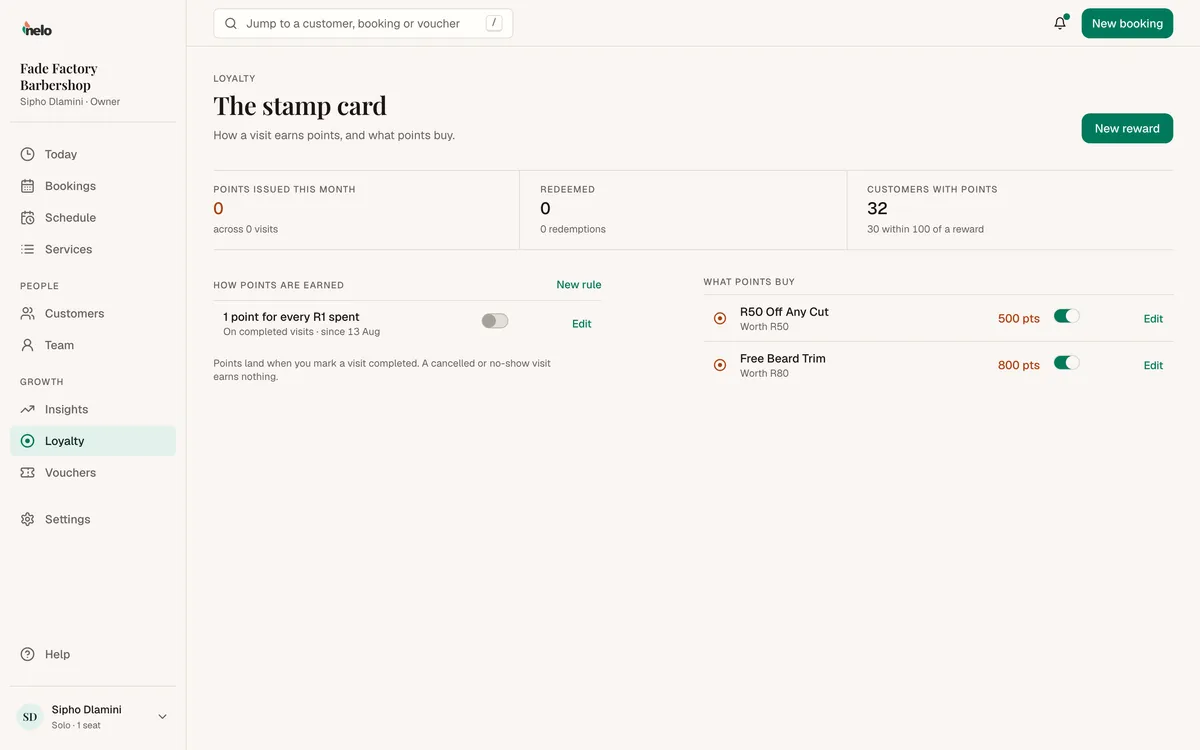
1. How points are earned
Under How points are earned, tap New rule. Choose one:
- Per visit: the same points for every visit.
- Per rand: points for each R1 spent.
You can pause a rule. If you delete one, points already on customers' cards stay.
2. What points buy
Under What points buy, tap New reward. Choose one:
- A free service
- Rands off
- Percent off
Then set Points needed. You can hide a reward from customers.
When points land
Points land when you mark a visit completed. Not when the customer books. So close out every visit. See Take and manage bookings.
Giving a reward
Customers see a reward as ready once they have enough points. They show it at your counter.
- In the sidebar, tap Customers and open that customer.
- Under Rewards, find the reward and tap Give reward.
- Confirm. The points come off their card straight away.
Only rewards they have enough points for show there.