

Book a visit
Pick a service, a day and a time. It takes under a minute.
- Open the business's booking link. Businesses share it on WhatsApp, on Instagram or as a QR code. It looks like nelo.co.za/book/their-name.
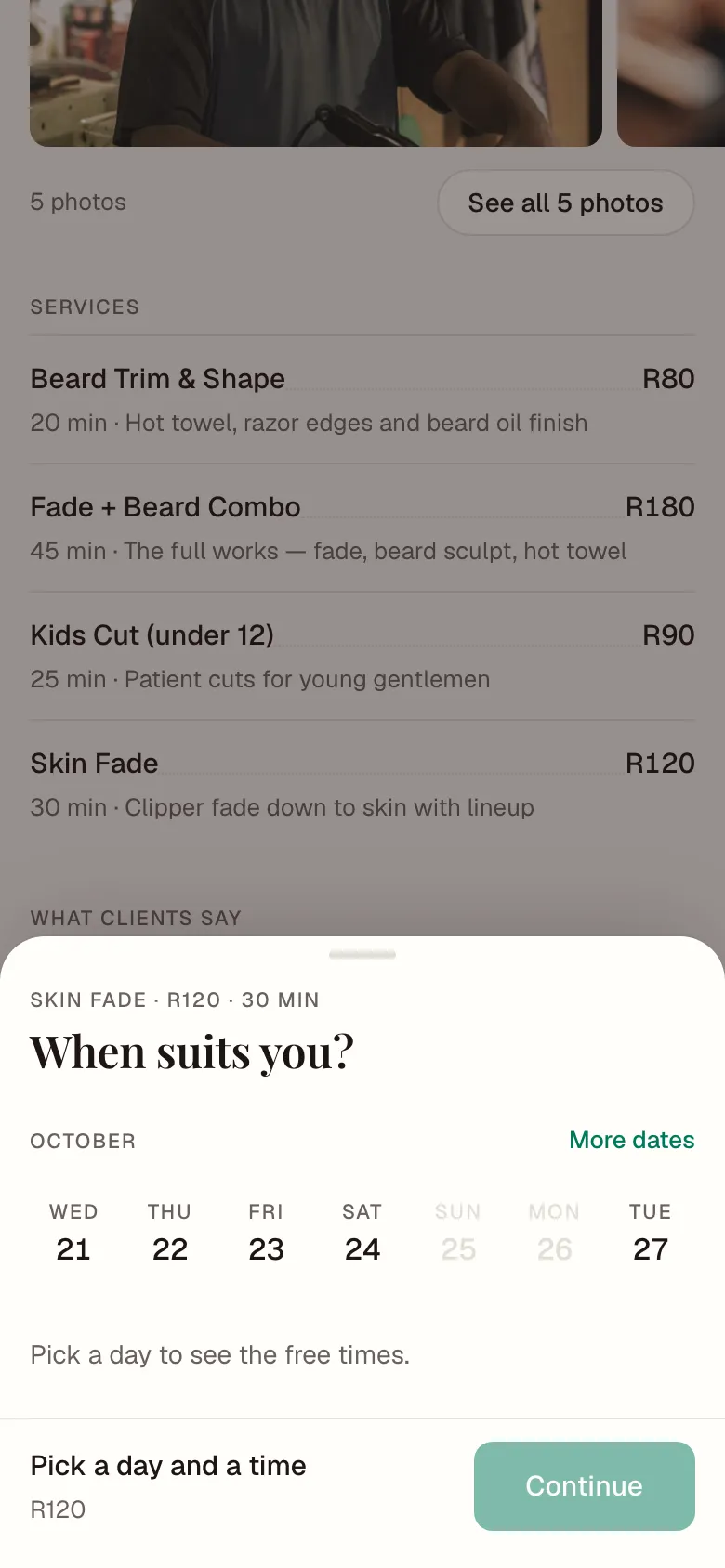
- Under Services, tap the one you want. You see the price and how long it takes.
- If the business has a team, choose Who with: one person, or Anyone.
- Pick a day, then a time. Grey days are days they are closed. Tap More dates to look further ahead.
- Tap Continue and check the details. Add a note if the business should know something, like a colour, a reference or an allergy.
- Tap Confirm booking.
Not signed in yet? The button says Sign in and confirm. Sign in with your phone number, and your booking is still there, ready to confirm.
Paying
You don't pay online. You pay the business at your visit.
Booked, or waiting?
Some businesses confirm every booking on the spot. Others check each one first. Their booking page tells you which.
- You're booked means it is confirmed.
- Request sent means the business will check it. We email you when they confirm.
Don't forget it
- Tap Add to calendar after you book.
- Your bookings are always under Bookings at nelo.co.za/portal.
- If the business uses WhatsApp, a box lets you get a WhatsApp message about the booking and a reminder the day before. It is ticked for you. Untick it if you don't want messages.